

فیگما یک ابزار چندکاره مبتنی بر تکنولوژی ابری است که در عملکرد بسیار شبیه به Sketch است. اگر از کاربران ویندوز یا مک هستید به راحتی میتوانید فیگما را روی سیستم عامل خود نصب کنید و حتی میتوانید آن را بدون هیچ مشکلی روی مرورگر خود اجرا کنید. این ابزار به شما کمک میکند که پروژههای خود را با سرعت زیاد و با تعامل کامل با تیمهای مختلف اجرا کنید. قابلیتهای مختلف فیگما این امکان را به شما میدهد تا مجموعهای از کامپوننتها را با دقت و سرعت بالا پیادهسازی کنید و در پروژههای خود به کار ببرید. آرت بوردها و فریمهای خود را به خوبی مدیریت کنید و بیش از پیش از طراحی لذت ببرید. دوره Learn Figma UI/UX Design Essential Training با استفاده از ابزارهای قدرتمند موجود در Figma طراحی رابط و تجربه کاربری را پوشش می دهد.
Learn Figma UI/UX Design Essential Training
دوره آموزشی نرم افزار فیگما از یودمی
طراحی رابط و تجربه کاربری
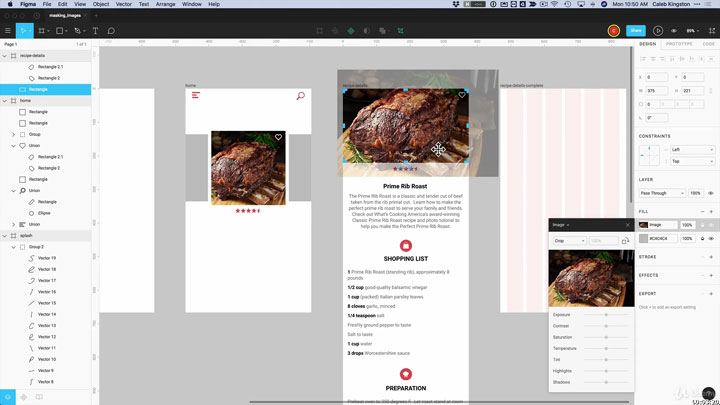
عنوان دوره آموزشی: Learn Figma UI/UX Design Essential Training
مدرس: Caleb Kingston
منتشر کننده: Udemy
مدت زمان آموزش: 03:54:39
سطح: مقدماتی تا پیشرفته (مناسب برای همه)
فرمت تصویری: mp4@720p
فرمت صوتی: AAC, 48kHz, 2ch
زبان: انگلیسی
زیرنویس انگلیسی: دارد
فایل تمرین: دارد
نرم افزار مورد نیاز: Figma
اطلاعات فایل
- حجم فایل: 607 مگابایت
- رمز فایل: www.downloadha.com
- تاریخ انتشار: March 2019
- قیمت: 69.99 دلار
Description:
Figma is a very powerful application that runs online. There are virtually no platform boundaries when it comes to using figma because you can design within a web browser or using their desktop application made for windows and macs. Figma is similar to Sketch and Adobe XD but is the more powerful of the three when it comes to team collaboration and responsive, fast paced design. This course will cover user interface designing using the powerful tools within Figma. In the first section, I’ll cover the Figma interface and where you can find powerful tools like constraints to make your designs responsive, and components to build a library of design elements to use throughout your projects. I’ll also go over real-time team collaboration and how you can use figma to work closely with others in the same project. Later on I will guide you through designing and prototyping a “Chef’s Recipes” App which will include multiple artboards, custom icon designs, editing images and text, and everything else you need to create a polished realistic design. Please join me as a beginner in design or as a seasoned UI/UX designer wanting to switch from other tools like Sketch or Adobe XD
Who this course is for:
User Interface designers
Web Designers
Graphic Designers
UX Designers
Beginners looking to get into the UI/UX field
Requirements:
Internet Access
You should know your way around computer basics